
Microsoft Store apps become scriptable
Windows adds CLI install and update path for Store packages, convenience arrives with new supply-chain and policy questions
Images
 You Can Now Install—and Update—Microsoft Store Apps Using the Command Line
wired.com
You Can Now Install—and Update—Microsoft Store Apps Using the Command Line
wired.com
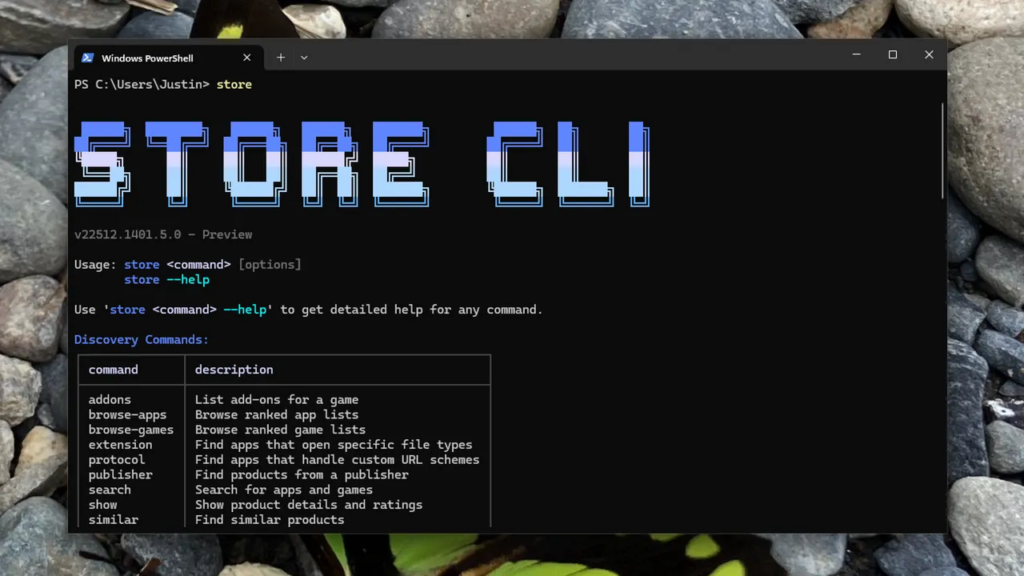 You Can Now Install—and Update—Microsoft Store Apps Using the Command Line
dnyuz.com
You Can Now Install—and Update—Microsoft Store Apps Using the Command Line
dnyuz.com
Microsoft has quietly done something useful: it is now possible to install and update Microsoft Store apps from the command line in Windows, rather than being forced through the Store GUI. Wired reports that Windows users can now drive Store app installs and updates via CLI, a change that effectively turns the Store into a scriptable distribution surface rather than a consumer-facing shopping mall (and, at times, an adware bazaar).
The immediate appeal is obvious for anyone who treats Windows machines as cattle, not pets. A CLI interface means Store apps can be provisioned in repeatable scripts, folded into automated setup flows, and run without the ritual of clicking through a UI that was designed for impulse installs and “recommended” content. In practice, this pulls Store-delivered packages closer to the operational model of package managers: declarative lists, idempotent installs, and predictable upgrades.
But the technical and governance implications are the real story. A CLI pathway doesn’t eliminate the Store’s gatekeeping; it just makes it easier to consume. You are still trusting Microsoft’s packaging pipeline, signing infrastructure, policy enforcement, and whatever server-side decisions determine which binary you get today versus yesterday. The same centralized distribution that simplifies patching also concentrates failure modes: a compromised publisher account, a poisoned update, or a policy change upstream becomes instantly scalable—now with the added efficiency of automation.
For enterprises, this will collide with the existing Windows management ecosystem: MDM profiles, AppLocker/WDAC policies, and Store restrictions that many organizations rely on to keep consumer apps out of managed fleets. A CLI install surface can be a boon for IT—if it respects device policy boundaries and produces auditable events—but it also creates a more convenient path for shadow IT if policy is lax. A GUI Store was at least friction; a scriptable Store is frictionless.
Security tradeoffs are similarly ambivalent. Centralized stores can reduce malware by enforcing signing and review, but they also create a monoculture and a single point of coercion. When distribution is centralized, it becomes legible to regulators and irresistible to governments. The same mechanism that pushes updates can push removals, region blocks, or “compliance” builds.
The punchline is that Microsoft is offering users and admins more control—by giving them better tooling to interface with Microsoft’s control plane. That’s still progress in day-to-day operations. Just don’t confuse a nicer lever with decentralization.
Sources: Wired; DNyuz repost of Wired.